Service Description
Improve the efficiency of customer onboarding operations with professional Retail Banking Customer Onboarding Workflow Automation solutions from NUA Enterprises.
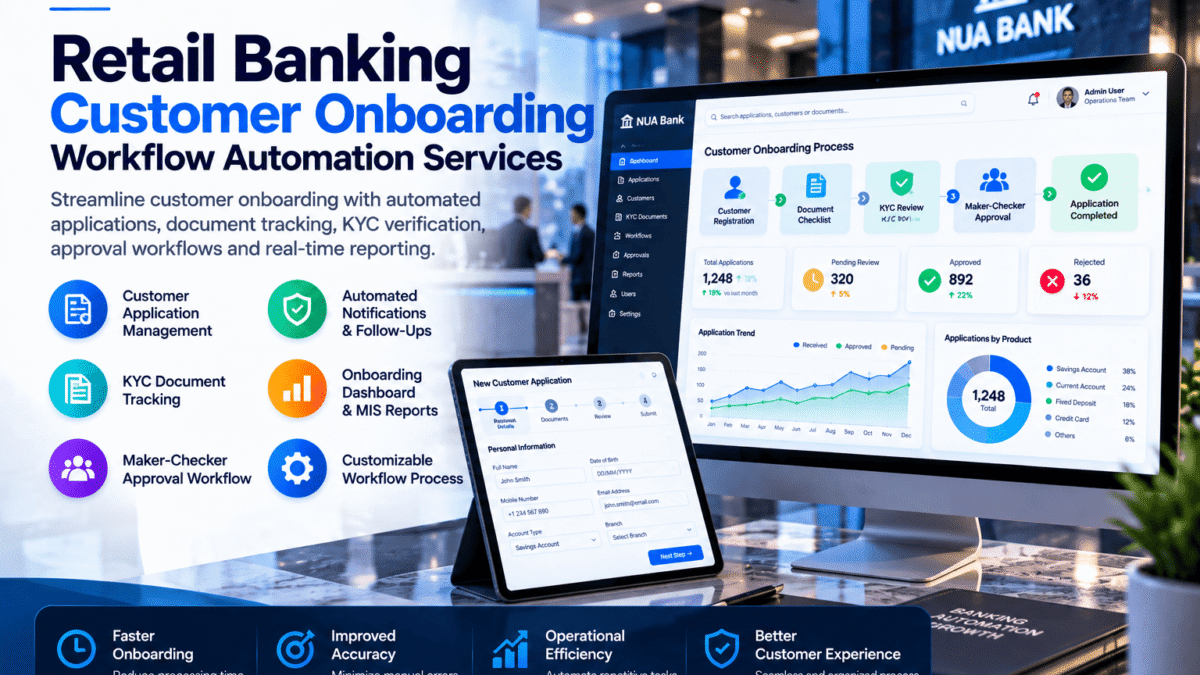
Our custom workflow automation services help banks and financial institutions organize customer applications, track required documents, manage internal approval processes, monitor onboarding progress, and generate operational reports.
Whether your organization manages savings accounts, current accounts, customer registration, or other retail banking onboarding activities, we can develop tailored workflow tools based on your operational requirements.
Our Retail Banking Onboarding Automation Solutions
1. Customer Application Management
Organize customer onboarding applications through a centralized workflow.
Available features may include:
- Customer application registration
- Unique application reference numbers
- Application status tracking
- Customer information forms
- Assigned processing officers
- Application history
- Pending and completed application views
- Search and filtering tools
2. KYC Document Collection & Tracking
Manage customer identification and supporting documentation requirements through configurable checklists.
Features may include:
- KYC document checklists
- Document submission status
- Missing document identification
- Document expiry tracking
- Supporting document upload
- Document review status
- Verification task assignments
- Document completion indicators
Automated document tracking does not replace required identity verification or regulatory compliance procedures.
3. Banking Approval Workflow Automation
Develop structured internal approval workflows to support application processing.
Potential capabilities include:
- Maker-checker workflow
- Application review stages
- Department-based approval routing
- Approval and rejection status
- Pending action notifications
- Reviewer comments
- Escalation indicators
- Approval history
4. Customer Onboarding Status Dashboard
Monitor customer onboarding progress through a centralized reporting dashboard.
Available dashboard features may include:
- Total applications received
- Applications pending review
- Approved applications
- Returned or rejected applications
- Pending documentation
- Processing stage summaries
- Officer-wise workload
- Application ageing reports
5. Automated Notifications & Follow-Ups
Reduce manual follow-up activities through configurable workflow notifications.
Depending on the agreed scope, features may include:
- Pending document reminders
- Internal task notifications
- Application status alerts
- Approval request notifications
- Overdue task indicators
- Escalation reminders
Email, SMS, and external messaging integrations require compatible services and may involve additional costs.
6. Onboarding Document Management
Organize onboarding documents and related records through structured document handling.
Possible features include:
- Document categorization
- Application-linked attachments
- Document review status
- File naming conventions
- Controlled document access
- Document history records
- File type and size restrictions
Security, retention, and access-control requirements must be defined during project planning.
7. Banking MIS & Operational Reporting
Generate structured reports to support onboarding management and operational reviews.
Reporting options may include:
- Daily application MIS
- Pending application reports
- Application processing summaries
- Officer productivity reports
- Missing documentation reports
- Ageing analysis
- Approval and rejection summaries
- Excel or CSV export
8. Audit Trail & Activity Monitoring
Support operational accountability through application activity records.
Potential capabilities include:
- Application creation timestamps
- Status change history
- User activity records
- Approval timestamps
- Reviewer comments
- Processing history
- Exception logs
Audit trail implementation and retention controls depend on the approved technical scope.
9. Banking System Integration
For advanced projects, onboarding workflows may connect with authorized banking systems through supported APIs or approved integration interfaces.
Integration possibilities include:
- Customer information systems
- Document management systems
- Internal banking databases
- Customer relationship management platforms
- Reporting databases
- Notification services
Direct core banking integration, live account opening, biometric verification, and third-party identity verification are not included in introductory packages.
Who Can Benefit from This Service?
- Retail Banks
- Commercial Banks
- Digital Banking Operations Teams
- Microfinance Institutions
- Financial Service Providers
- Banking Customer Service Departments
- Account Opening Departments
- Banking Operations & Compliance Teams
Benefits of Customer Onboarding Workflow Automation
Centralized Application Tracking
Monitor customer onboarding applications through a structured interface.
Reduced Manual Follow-Ups
Use workflow statuses and reminders to organize pending activities.
Improved Document Visibility
Identify missing, pending, and reviewed customer documents.
Structured Approval Processes
Route applications through defined review and approval stages.
Operational Reporting
Generate application status, processing, and management reports.
Configurable Workflows
Adapt processing stages and document checklists to approved operational requirements.
Our Development Process
Step 1 — Requirements Assessment
We review your existing onboarding process, required documents, approval stages, and reporting needs.
Step 2 — Workflow Planning
We prepare the proposed application lifecycle, user roles, status definitions, and process flow.
Step 3 — Interface Design
We design the agreed application forms, tracking screens, dashboards, and reporting views.
Step 4 — Workflow Development
We develop the approved workflow functionality using the agreed technology stack.
Step 5 — Testing & Validation
We test application statuses, form validation, approval routing, and reporting using synthetic or anonymized sample data.
Step 6 — Delivery
We provide the agreed software deliverables, documentation, and demonstration of completed functionality.
What We Need from You
- Existing customer onboarding workflow
- Application form requirements
- Required document checklist
- Approval hierarchy
- User roles and permissions
- Application status definitions
- Sample MIS reporting formats
- Preferred software platform
- Integration requirements, if applicable
- Security and data retention requirements
Please do not provide actual customer identity documents or sensitive banking records during initial project discussions.
Important Banking & Compliance Information
Our introductory packages focus on configurable workflow prototypes and internal process automation using synthetic or anonymized sample data.
Production deployment for a regulated financial institution requires separately agreed security architecture, access controls, testing, data protection measures, and organizational approvals.
NUA Enterprises does not claim that its workflow tools automatically satisfy KYC, AML, customer due diligence, or banking regulatory requirements.
Final customer verification, regulatory compliance, and account approval decisions remain the responsibility of the financial institution.
Improve Retail Banking Onboarding Operations
Organize customer applications, streamline document tracking, and simplify internal processing with customized onboarding workflow automation from NUA Enterprises.
Our solutions can be tailored to the operational requirements of banks and financial institutions seeking more structured customer onboarding processes.