However, successful AI video production requires more than entering a prompt into an AI video generator. Companies still need project planning, creative direction, quality control, brand guidelines, and an organized approval process.
In this guide, we explain how businesses manage AI video projects from start to finish, which AI video production tools they can consider, and how to build an efficient workflow for creating professional business videos.
What Is AI Video Project Management?
AI video project management is the process of planning, organizing, producing, reviewing, and delivering video content created or enhanced using artificial intelligence.
It combines traditional video production practices with AI tools for script development, visual generation, animation, voiceovers, editing, and content adaptation.
Businesses use AI video project management to coordinate activities such as:
- Developing AI video marketing strategies.
- Defining project goals and target audiences.
- Writing promotional video scripts.
- Preparing storyboards and visual references.
- Selecting AI video generation platforms.
- Managing AI-generated video assets.
- Reviewing video quality and brand consistency.
- Coordinating stakeholder approvals.
- Publishing videos across digital marketing channels.
- Measuring engagement and campaign performance.
The purpose is to establish a repeatable production process rather than treating every AI-generated video as an isolated experiment.
Why Do Businesses Need a Structured AI Video Production Workflow?
AI video generators can produce visual content quickly, but speed alone does not guarantee that the final video will communicate the intended message.
A structured AI video production workflow helps businesses maintain creative consistency, reduce unnecessary generation attempts, and organize their marketing assets.
1. Better Project Planning
Businesses can define the video objective, intended audience, message, length, and distribution channel before beginning production.
2. More Consistent Branding
Brand guidelines help teams maintain consistent colors, typography, visual styles, product representation, and tone across AI-generated promotional videos.
3. Improved Budget Control
AI video generation may involve subscription charges, generation credits, editing software, and staff time. Project planning helps teams monitor these expenses.
4. Organized Collaboration
Marketing managers, content creators, editors, and business stakeholders can work with shared scripts, feedback records, and approval responsibilities.
5. Better Content Quality
A review process helps identify visual inconsistencies, inaccurate product details, unsuitable voiceovers, and other issues before publication.
How Do Businesses Manage AI Video Projects Step by Step?
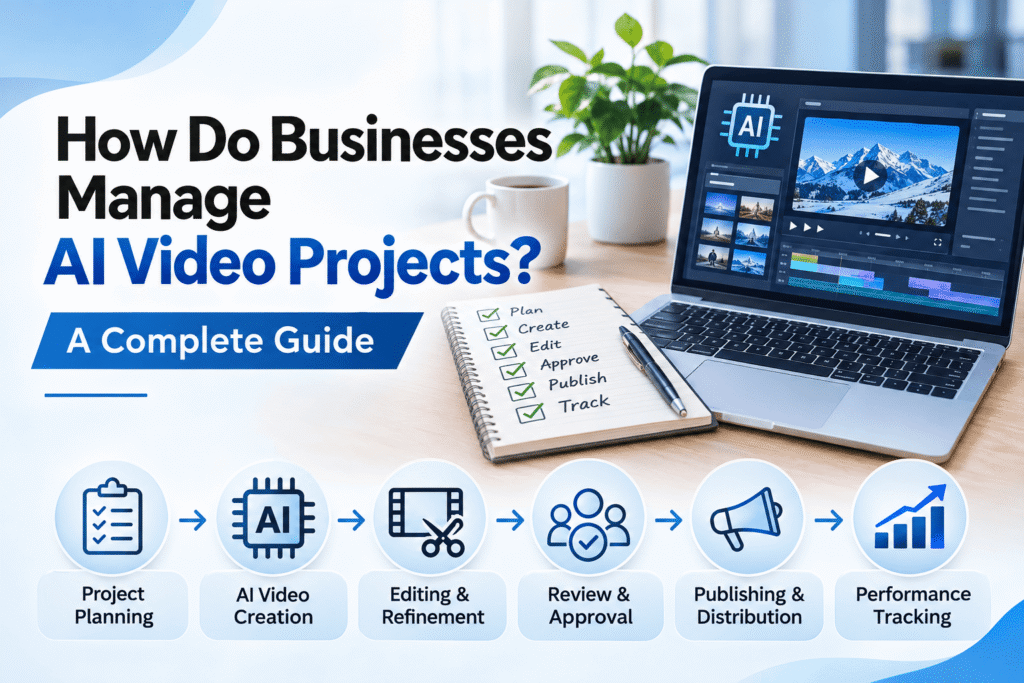
A practical business AI video production process can be divided into nine stages.
Step 1: Define the AI Video Project Objectives
The first step is identifying why the business needs the video. Every project should have a clear purpose and a measurable outcome where possible.
Common objectives include:
- Introducing a new product or service.
- Promoting a business through social media advertising.
- Explaining complex products or technical services.
- Creating short promotional videos for digital campaigns.
- Producing educational or training content.
- Increasing awareness of a business or brand.
- Supporting website and landing page content.
For example, a real estate company may require an AI-generated property promotional video, while a software company may need a product demonstration or an animated service explainer.
The business should also identify the target audience, preferred video duration, language, and publishing platform.
Step 2: Create an AI Video Project Brief
An AI video project brief provides direction to everyone involved in production.
A useful project brief should include:
- Project name: The working title of the video.
- Business objective: The intended outcome.
- Target audience: The people the video should reach.
- Core message: The main information to communicate.
- Video format: Promotional, educational, explainer, or advertisement.
- Video duration: The intended running time.
- Visual style: Corporate, cinematic, animated, or realistic.
- Brand assets: Approved logos, colors, fonts, and product images.
- Budget: The available production resources.
- Delivery deadline: The required completion date.
- Approval owner: The person responsible for final approval.
A clear brief reduces confusion during AI video creation and makes it easier to evaluate whether the finished content meets the original requirements.
Step 3: Develop the Script and Storyboard
The next stage is preparing the story before generating visuals.
Businesses can use AI writing assistants to brainstorm ideas, prepare script drafts, and explore different messaging approaches. However, the final script should be reviewed by a person who understands the business and its products.
A typical promotional video script includes:
- Opening hook: Capture the viewer’s attention.
- Problem: Identify a customer need or challenge.
- Solution: Introduce the relevant product or service.
- Key benefits: Explain the practical value.
- Closing message: Encourage an appropriate next step.
A storyboard divides the script into scenes and describes what should appear on screen. It may specify camera angles, lighting, backgrounds, characters, products, and transitions.
For AI-generated videos, detailed storyboards also make it easier to write consistent prompts across multiple scenes.
Step 4: Choose the Right AI Video Production Tools
Businesses should choose AI video creation platforms based on the type of content they want to produce.
Some platforms focus on cinematic AI-generated scenes, while others specialize in avatar presentations, automated editing, or marketing video production.
Google Flow — AI Video Creation and Cinematic Storytelling
Google Flow is an AI creative studio from Google that supports video creation and refinement using Google’s generative AI models, including Veo.
Businesses can consider Google Flow for visual concept development, promotional scenes, cinematic storytelling, product advertising concepts, and other creative projects.
Depending on the available features and selected model, Google Flow supports workflows involving text prompts, reference images, scene development, and video editing.
For example, a company promoting a new technology product might use Google Flow to explore cinematic product scenes before assembling a complete marketing video.
Google Flow’s capabilities, usage limits, and availability can vary by subscription, region, and model. Businesses should review the current product terms and confirm that their intended commercial use is permitted.
Runway — AI Video Generation and Creative Editing
Runway provides AI-powered creative tools for generating and editing visual content.
It can be considered for creative experimentation, video scene generation, visual effects, and AI-assisted production workflows.
Adobe Firefly — Generative Creative Content
Adobe Firefly provides generative AI capabilities for visual content creation, including video-related creative workflows.
It may be useful for businesses that already use Adobe’s creative software ecosystem. Commercial usage conditions should be checked for the specific model and feature selected.
Synthesia — AI Avatar and Presentation Videos
Synthesia is an AI video platform focused on presenter-style content, including training, educational, and business communication videos.
Businesses may consider it when they need structured presentations or instructional content rather than cinematic advertising scenes.
HeyGen — AI Avatar and Business Video Creation
HeyGen offers AI video creation tools with avatar-based presentation capabilities.
It can be considered for spokesperson-style marketing, business communication, and multilingual presentation workflows, subject to available features and usage rights.
Step 5: Generate AI Video Scenes and Assets
After selecting the tools, the production team can begin creating the required video scenes.
The process may involve text-to-video generation, image-to-video generation, AI voiceovers, animated graphics, and other digital assets.
A well-written AI video prompt should describe:
- The subject or product.
- The action taking place.
- The environment or background.
- The preferred camera movement.
- The lighting and visual atmosphere.
- The intended style and mood.
- The video orientation and composition.
- Any important visual restrictions.
Example AI Video Prompt for a Business Advertisement
Create a premium cinematic promotional video featuring a modern technology company workspace. Show a professional desktop application interface, subtle digital animations, elegant camera movement, realistic studio lighting, and a sophisticated navy-blue corporate atmosphere. Use smooth transitions and realistic visual details. Avoid unrelated logos, distracting text overlays, and unnecessary background elements.
Businesses should save their prompts, approved reference images, and selected video outputs. This makes it easier to maintain visual consistency when producing additional scenes.
Step 6: Review and Edit AI-Generated Video Content
AI-generated content should be reviewed before it becomes part of a published business video.
Important quality checks include:
- Correct product appearance and specifications.
- Consistent characters and visual environments.
- Natural movement and realistic scene details.
- Accurate captions and on-screen text.
- Appropriate audio quality and voice pronunciation.
- Consistent brand colors and presentation style.
- Suitable video duration and pacing.
- Correct aspect ratio for the publishing platform.
- Permission to use included images, voices, and other assets.
Businesses may combine AI-generated scenes with conventional video editing tools to add titles, captions, sound effects, music, transitions, and final branding.
The final video should communicate accurate information rather than relying only on attractive visuals.
Step 7: Manage Team Collaboration and Approvals
AI video project management also involves coordinating feedback from stakeholders.
A practical approval process can include:
- Script approval.
- Storyboard or visual concept approval.
- Review of initial AI-generated scenes.
- Review of the assembled video.
- Brand and factual accuracy checks.
- Final publication approval.
Businesses can use project management tools such as Trello, Asana, or ClickUp to assign responsibilities, monitor deadlines, and document feedback.
Files should be organized using consistent names and version numbers so that teams can identify approved assets and avoid publishing outdated drafts.
Step 8: Publish AI Videos Across Marketing Platforms
Once the video is approved, businesses can prepare it for distribution across their preferred digital channels.
Common publishing platforms include:
- YouTube for video marketing and educational content.
- Instagram Reels for short-form promotional videos.
- Facebook for business advertising and audience engagement.
- LinkedIn for professional and B2B communication.
- TikTok for suitable short-form marketing campaigns.
- Business websites and service landing pages.
- Email marketing campaigns.
Different channels may require different aspect ratios, captions, durations, thumbnails, and opening sequences.
Businesses should also follow each platform’s policies concerning synthetic or AI-generated media, including disclosure requirements where applicable.
Step 9: Measure AI Video Marketing Performance
Publishing a video is not the final stage of an AI video project. Businesses should measure whether the content supports its intended marketing objective.
Useful performance indicators include:
- Video views and reach.
- Audience retention and watch time.
- Video completion rate.
- Likes, comments, and shares.
- Click-through rate.
- Website visits generated by the video.
- Lead enquiries and conversions.
- Advertising cost and campaign performance.
The most relevant metrics depend on the video’s objective. For example, a brand awareness campaign may emphasize reach and engagement, while a lead generation campaign may focus on qualified enquiries.
AI Video Project Management Workflow: Practical Example
Consider a small business planning a short promotional video for a new digital service.
| Stage | Business Activity | Expected Output |
|---|---|---|
| Planning | Define audience, objective, and message | Approved project brief |
| Scriptwriting | Prepare promotional script | Approved video script |
| Storyboarding | Plan scenes and visual references | Scene-by-scene storyboard |
| AI Generation | Create video scenes using suitable AI tools | Generated video assets |
| Editing | Assemble clips, captions, and audio | Complete video draft |
| Quality Control | Check brand, accuracy, and technical quality | Approved final video |
| Distribution | Publish on selected platforms | Live promotional content |
| Performance Review | Monitor engagement and marketing outcomes | Campaign performance report |
This approach can be adapted for product demonstrations, social media advertisements, educational videos, corporate presentations, and other business content.
How Can Businesses Manage Multiple AI Video Projects?
Businesses producing AI videos regularly need an organized system for handling several projects simultaneously.
Use a Centralized Project Dashboard
Maintain a project board containing video titles, assigned team members, deadlines, approval status, and publishing schedules.
Create Reusable Video Templates
Prepare reusable formats for product advertisements, service explainers, educational clips, and social media promotional videos.
Maintain an AI Video Asset Library
Organize approved scripts, prompts, images, generated clips, voiceovers, music licenses, and final exports.
Standardize Quality Control
Use the same checklist for checking visual consistency, factual accuracy, accessibility, brand guidelines, and publishing requirements.
Assign Clear Responsibilities
Identify who prepares scripts, generates content, edits videos, approves the output, and manages publication.
Track Production Costs
Monitor AI generation credits, subscriptions, editing time, external creative services, and other project expenses.
Common Challenges in Managing AI Video Projects
Inconsistent Characters and Visuals
AI-generated scenes may not always maintain identical character appearances, product details, or environments.
Recommended approach: Use approved reference images, consistent visual instructions, and quality checks throughout production.
Unexpected Generation Results
AI tools may produce scenes that differ from the intended script or storyboard.
Recommended approach: Use specific prompts, test short scenes, and refine outputs before assembling the complete video.
Unclear Project Requirements
Projects can become inefficient when the business has not defined the video objective, audience, or final deliverables.
Recommended approach: Prepare a detailed creative brief and obtain agreement on the intended scope.
Copyright, Consent, and Commercial Usage
Businesses need to understand the usage conditions of AI-generated content and any third-party assets.
Recommended approach: Review platform terms, maintain records of licensed materials, and obtain appropriate permission for identifiable people, voices, trademarks, and other protected content.
Inaccurate or Misleading Video Content
AI-generated visuals can unintentionally misrepresent a product, property, person, or business service.
Recommended approach: Verify important claims, review product representations, and clearly distinguish illustrative AI scenes from real footage when necessary.
AI Video Production vs. Traditional Video Production
AI video production and traditional filming can support different business requirements.
| Factor | AI Video Production | Traditional Video Production |
|---|---|---|
| Visual Creation | AI-generated or AI-assisted scenes | Camera-recorded footage |
| Physical Production | May reduce the need for physical filming | Often requires filming equipment and locations |
| Creative Iteration | Prompt-based generation and editing | Editing, reshoots, and post-production |
| Authenticity | Generated scenes require careful verification | Can document actual people, products, and events |
| Best Applications | Concept videos, animation, and selected promotional content | Real demonstrations, interviews, and documentary footage |
Many businesses may benefit from a hybrid approach, combining genuine footage with AI-assisted visual production, graphics, and editing.
How Much Does It Cost to Manage an AI Video Project?
AI video production costs depend on the project’s complexity, required tools, video duration, visual quality, and editing requirements.
Common cost factors include:
- AI video generation credits and subscriptions.
- Scriptwriting and creative planning.
- Storyboard preparation.
- AI voiceover production.
- Video editing and post-production.
- Custom graphics and animations.
- Number of scenes and output formats.
- Project coordination and quality control.
A simple short-form video using existing assets may require fewer resources than a multi-scene cinematic advertisement with complex visual requirements.
Businesses should request a clearly defined quotation based on the actual deliverables rather than assuming that every AI-generated video has the same production cost.
Best Practices for Successful Business AI Video Projects
Businesses can improve their AI video creation process by following these practical guidelines:
- Start every project with a measurable objective.
- Prepare a detailed script and storyboard.
- Select tools based on the required video format.
- Use consistent prompts and reference assets.
- Verify product information and marketing claims.
- Review AI-generated visuals before publication.
- Maintain clear approval responsibilities.
- Organize project files and final video versions.
- Follow applicable platform and commercial usage policies.
- Measure performance and improve future content.
How NUA Enterprises Supports AI Video Production for Businesses
Businesses that want to create promotional videos, product advertisements, digital marketing content, or engaging brand visuals can explore the AI Video Production services at NUA Enterprises .
Our AI Video Production service category focuses on professional AI video production services for promotional videos, product advertising, digital marketing, and engaging business content.
Depending on the requirements of an individual project, AI-assisted video production can support:
- Business promotional videos.
- Product advertising videos.
- Social media marketing videos.
- Real estate promotional content.
- Service explanation videos.
- Brand awareness campaigns.
- Short-form digital advertisements.
- AI-assisted visual storytelling.
Businesses can discuss their objectives, preferred video style, duration, and marketing requirements to determine an appropriate production approach.
Explore NUA Enterprises AI Video Production Services
Frequently Asked Questions About AI Video Project Management
1. How do businesses manage AI video projects?
Businesses manage AI video projects by setting objectives, preparing scripts and storyboards, choosing AI video tools, generating scenes, reviewing content, coordinating approvals, publishing videos, and monitoring performance.
2. What is an AI video production workflow?
An AI video production workflow is an organized sequence of activities covering planning, scriptwriting, visual generation, editing, quality control, approval, and delivery.
3. Which AI video tools can businesses use?
Businesses can explore tools such as Google Flow, Runway, Adobe Firefly, Synthesia, and HeyGen. The appropriate platform depends on whether the project requires cinematic visuals, AI avatars, promotional content, or other video capabilities.
4. Can businesses use Google Flow for promotional videos?
Google Flow provides AI-assisted video creation capabilities that businesses can evaluate for promotional scenes, visual storytelling, and marketing concepts. Commercial usage conditions and available features should be checked before production.
5. How can companies maintain brand consistency in AI videos?
Companies can maintain brand consistency by using approved brand guidelines, reference images, consistent prompts, standardized templates, and a documented review process.
6. Can AI video production reduce marketing costs?
AI-assisted production may reduce certain filming or creative production expenses, but overall costs depend on generation usage, editing requirements, project complexity, and quality control.
7. How do businesses manage multiple AI video campaigns?
Businesses can use centralized project dashboards, shared asset libraries, production schedules, reusable templates, and clear approval workflows to coordinate multiple campaigns.
8. What should businesses check before publishing AI videos?
Businesses should check factual accuracy, brand consistency, visual quality, copyright and consent requirements, audio clarity, captions, and platform disclosure policies.
9. How do businesses measure AI video marketing success?
Businesses can measure performance using views, watch time, engagement, click-through rates, website traffic, enquiries, and conversions, depending on campaign objectives.
10. Where can businesses find AI video production services?
Businesses looking for AI-assisted promotional videos, product advertising, and digital marketing content can explore NUA Enterprises AI Video Production Services and review the available service options.
Conclusion: Managing AI Video Projects Successfully
So, how do businesses manage AI video projects successfully? The key is combining AI-powered creative tools with a structured production process.
From project planning and scriptwriting to AI video generation, editing, approvals, and performance analysis, each stage contributes to the quality and usefulness of the final content.
Platforms such as Google Flow can help businesses explore new approaches to visual storytelling, but effective project management, human review, and clear marketing objectives remain essential.
If your business is planning an AI promotional video, product advertisement, or digital marketing campaign, explore the professional AI Video Production services offered by NUA Enterprises .