What Is Business Dashboard Development?
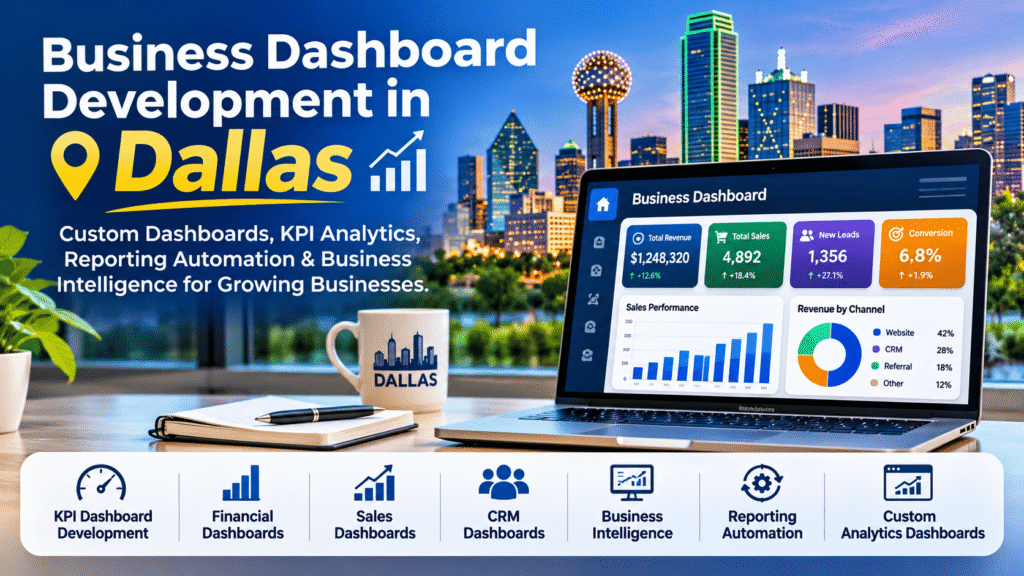
A business dashboard is a visual workspace that brings important metrics together in one place. Instead of opening separate sales, finance, inventory, and customer reports, decision-makers can see a focused view of performance. Some dashboards update on a schedule; others refresh more frequently when the underlying systems support it.
Business dashboard development Dallas searches often reflect a practical need: a company wants reporting that fits the way its teams actually work. A dashboard project can involve connecting data sources, cleaning inconsistent records, defining performance indicators, designing charts, setting permissions, and testing the results with real users.
Why Dallas Businesses May Need Custom Dashboards
Dallas businesses span professional services, retail, logistics, healthcare, real estate, technology, and financial operations. These organizations have different reporting requirements, but they often share a familiar problem: important information lives in multiple applications.
A distributor might need inventory and order fulfillment figures alongside sales performance. A professional services firm may want billable utilization and project profitability. A growing retailer might need to compare store performance, online orders, and returns. A useful dashboard turns those separate questions into a manageable daily view.
Not every business needs a custom platform from day one. A well-designed spreadsheet or an existing analytics product may be enough. Custom development becomes more compelling when standard reports cannot handle the required data connections, calculations, user roles, or workflows.
Custom Dashboard Development Dallas: What Makes a Dashboard Truly Custom?
Custom dashboard development Dallas businesses evaluate should begin with business questions rather than software features. A custom solution is designed around your metrics, terminology, data sources, and approval processes instead of forcing your team to adapt to a generic template.
For example, two companies may both track revenue, but one needs revenue by branch and product category while another needs revenue by account manager, contract, and renewal date. The charts may look similar; the business logic underneath them is not.
A custom analytics dashboard Dallas company might request can include role-based access, filters for departments and time periods, exception alerts, drill-down reporting, and exports. The right combination depends on what decisions users need to make and how reliable the source data is.
Dashboard Development Services Dallas: What Should Be Included?
When comparing dashboard development services in Dallas, look beyond the design mockup. A complete engagement should address how the dashboard gets its numbers and how those numbers remain accurate after launch.
- Discovery: Identify the decisions the dashboard should support and the people who will use it.
- Data review: Assess spreadsheets, databases, accounting software, CRMs, and other systems.
- KPI definitions: Agree on formulas, reporting periods, exclusions, and data owners.
- Dashboard design: Create readable layouts with useful comparisons and filters.
- Integration and automation: Configure approved data connections and refresh schedules.
- Testing: Reconcile displayed figures against trusted source reports.
- Training and handover: Explain dashboard use, maintenance, access controls, and limitations.
Ask prospective developers who will maintain integrations when source systems change. A dashboard that looks excellent during a demonstration but stops refreshing a month later is not a successful reporting solution.
KPI Dashboard Development Dallas: Start With the Decisions That Matter
KPI dashboard development Dallas teams need should be selective. Putting every available metric on one screen makes it harder to recognize the few signals that deserve attention.
Start by asking: What would we change if this number rose or fell? For a sales director, that might be pipeline coverage, win rate, average deal size, and forecast versus target. For an operations manager, it might be order turnaround time, service backlog, or error rate. For an executive, it might be revenue growth, margin, cash position, and customer retention.
Every KPI needs a consistent definition. If finance calculates revenue using posted invoices but sales uses closed opportunities, the two dashboards should not quietly label both figures as “revenue.” Agreeing on definitions early prevents arguments later.
Business Intelligence Dashboard Dallas: Connecting Data to Better Questions
A business intelligence dashboard in Dallas may combine information from several departments to reveal patterns that isolated reports miss. For example, a company might compare customer acquisition costs with subsequent sales, returns, and service activity.
Business intelligence is broader than displaying charts. It involves preparing data, choosing useful measures, exploring relationships, and helping teams interpret results. Tableau’s business intelligence overview explains how analytics and data visualization support business decisions.
When planning a BI dashboard, ask which questions need a quick summary and which need deeper analysis. Executives may want a concise overview, while analysts need filters, comparisons, and access to detailed records.
Business Reporting Automation Dallas: Less Manual Work, More Reliable Reporting
Business reporting automation Dallas companies consider often starts with a recurring frustration: someone spends hours every week downloading files, copying numbers, correcting formats, and sending the same report to several people.
Reporting automation can reduce repetitive steps by pulling approved data from connected systems, applying consistent calculations, and refreshing dashboards at defined intervals. It may also generate scheduled summaries or notify the right person when a metric crosses an agreed threshold.
Automation is not the same as guaranteed real-time reporting. Refresh frequency depends on source systems, API limits, licensing, infrastructure, and the business’s actual need. A daily refresh may be sufficient for financial reporting, while operational monitoring may require more frequent updates.
Before automating a report, clean up the process itself. Automating incorrect formulas or duplicate records only makes bad information arrive faster.
Financial Dashboard Development Dallas: Make the Numbers Easier to Understand
Financial dashboard development Dallas organizations explore can help managers monitor revenue, operating expenses, gross margin, outstanding invoices, budget variance, and cash flow indicators. The most valuable financial dashboards make the assumptions behind each figure clear.
For instance, a business may want to compare actual expenses with budget by department, identify overdue receivables, or review profitability across locations. Finance users should be able to trace important totals back to approved source data and understand when the figures were last refreshed.
Financial dashboards also need careful permissions. Payroll, customer billing, and sensitive financial details should not be visible to every user merely because the dashboard is easy to share.
Sales Dashboard Development Dallas: See What Is Happening in the Pipeline
A sales dashboard development Dallas project can connect activity data with outcomes. Instead of counting calls alone, teams can examine how leads progress from initial enquiry to qualified opportunity, proposal, and completed sale.
Useful sales metrics may include leads by source, conversion rate, sales cycle length, forecast by stage, sales by representative, and repeat customer revenue. Managers can use these views to spot bottlenecks and ask better coaching questions.
Be careful with rankings that lack context. A representative handling complex enterprise accounts may have a longer sales cycle than someone selling smaller products. Dashboards should help teams understand performance, not encourage misleading comparisons.
CRM Dashboard Development Dallas: Connect Customer Activity With Results
CRM dashboard development Dallas businesses need often focuses on customer relationships across marketing, sales, and support. A CRM dashboard can reveal which lead sources produce qualified enquiries, where deals stall, how quickly teams respond, and which accounts may need follow-up.
Useful CRM metrics include new leads, lead response time, opportunity conversion, customer retention, support ticket status, and account activity. When integrating a CRM with financial or marketing systems, confirm how records are matched and how duplicates are handled.
For teams with multiple offices or departments, role-based access is especially important. A salesperson may need their own pipeline, while leadership needs a broader view without exposing unnecessary customer details.
Custom Analytics Dashboard Dallas: Build Around Your Industry
A custom analytics dashboard Dallas business chooses should reflect the questions its industry asks every day. There is no single ideal layout for every organization.
- Retail and e-commerce: Sales by channel, inventory turnover, returns, average order value, and fulfillment status.
- Logistics: Delivery performance, shipment delays, fleet utilization, and operating costs.
- Professional services: Project profitability, utilization, deadlines, and client billing.
- Real estate: Lead sources, listing activity, enquiry response times, and transaction pipeline.
- Financial operations: Reconciliation status, exception counts, reporting deadlines, and portfolio-level metrics.
The best dashboard is not necessarily the one with the most charts. It is the one that makes an important question easier to answer accurately.
Which Dashboard Technology Should Your Business Choose?
There are several credible options, and the right choice depends on existing systems, budget, access requirements, and the amount of customization needed.
Microsoft Power BI
Power BI can be a practical choice for organizations already using Microsoft data and reporting tools. Microsoft’s official Power BI dashboard documentation explains the distinction between a one-page dashboard and more detailed reports. Licensing, sharing, and refresh requirements should be reviewed before implementation.
Google Cloud Looker
Looker supports governed data exploration and dashboard creation. Google’s Looker dashboard documentation covers dashboard creation, filters, sharing, and scheduled delivery. It may suit organizations that need a structured analytics environment.
Tableau
Tableau is another option for interactive data analysis and visual exploration. Its business intelligence guide provides background on how organizations use dashboards and analytics.
Fully Custom Web Dashboards
When packaged tools do not meet the requirement, a custom web application may provide more control over interface design, workflows, integrations, and permissions. This approach can also require greater development and ongoing maintenance effort. Choose it because of a clear business need, not simply because a custom interface sounds more impressive.
How to Choose a Dashboard Development Company in Dallas
If you’re comparing a dashboard development company in Dallas with a remote development partner, evaluate the same fundamentals: communication, relevant technical experience, security practices, transparent scope, and post-launch responsibilities. Location can matter for onsite workshops, but it is not a substitute for a sound development process.
Ask each provider to explain how they would validate KPI definitions, handle missing data, protect sensitive information, document integrations, and support future changes. Request examples relevant to your industry where available, and clarify who owns the source code, configurations, and final deliverables.
Be cautious of promises that every system can be connected instantly or that a dashboard will automatically increase revenue. A good developer should be clear about technical constraints and the work needed to make the numbers trustworthy.
What Does Business Dashboard Development Cost?
Dashboard pricing depends on scope. A simple reporting view built from one clean data source is different from a multi-department platform that connects accounting software, CRM records, operational databases, and complex permissions.
Costs may include discovery, data preparation, dashboard design, software licensing, integration development, testing, hosting, training, and maintenance. Ask for a proposal that separates one-time implementation work from recurring platform and support costs.
For a first project, a focused pilot with a few agreed KPIs is often a sensible way to validate usefulness before expanding to more departments.
A Practical Dashboard Development Process
- Define the problem: Identify which decisions are delayed or difficult because reporting is fragmented.
- Choose the users: Clarify who needs an executive overview, a department view, or detailed analysis.
- Audit the data: Review data quality, access, formats, and refresh limitations.
- Agree on KPIs: Document formulas and obtain business-owner approval.
- Build a prototype: Validate layout and navigation before full development.
- Integrate and test: Connect sources and reconcile dashboard numbers with trusted reports.
- Launch carefully: Train users, establish ownership, and monitor early feedback.
- Improve over time: Add features only when they solve a demonstrated reporting need.
Explore Business Dashboard Services at NUA Enterprises
For organizations exploring business reporting and dashboard solutions, NUA Enterprises Business Dashboards is a starting point for reviewing dashboard-related services. Whether your team needs KPI tracking, financial reporting, sales visibility, CRM analytics, or a more tailored reporting workflow, the first step is defining the data and decisions that matter most.
NUA Enterprises serves businesses through its digital and software services. If your company is based in Dallas, you can use the service page to explore the offering and discuss whether your dashboard requirements are a suitable fit. This article does not imply a physical NUA Enterprises office in Dallas.
Frequently Asked Questions
What is business dashboard development in Dallas?
It is the process of planning and building dashboards for businesses operating in Dallas, including data integration, KPI design, visual reporting, testing, and ongoing maintenance where required.
How is a custom dashboard different from a standard report?
A standard report usually answers a predefined question. A custom dashboard can bring multiple measures together, show trends, and offer filters or drill-downs designed around the team’s workflow.
Can a dashboard connect to our CRM and accounting software?
Often, yes, when the relevant products provide supported APIs, connectors, or approved data exports. The exact options depend on the systems, permissions, and technical requirements.
Does a dashboard update in real time?
Not always. Some dashboards refresh at intervals, while others can support near-real-time or streaming data. The refresh design should match business needs and system capabilities.
What should a KPI dashboard include?
It should include a small set of meaningful measures with agreed definitions, relevant comparisons, clear time periods, and enough context to guide decisions.
Can a remote company develop a dashboard for a Dallas business?
Yes. Many discovery, design, development, and training activities can be handled remotely, provided access, communication, security, and delivery responsibilities are clearly agreed.
How long does dashboard development take?
Timing varies with data quality, number of integrations, user roles, testing requirements, and scope. A small pilot may be quicker than a complex multi-system reporting platform.
Final Thoughts
For Dallas businesses, better reporting starts with better questions. Whether you’re considering KPI dashboard development, financial analytics, CRM reporting, or business reporting automation, focus on accurate data, understandable metrics, and a workflow your team will actually use.
If you’re ready to explore the options, visit NUA Enterprises’ Business Dashboard services and start with the reporting challenge you want to solve.