Many business teams spend time moving information between systems, checking repetitive details, and answering similar questions. Automation can reduce some of that manual work, while AI can help interpret or draft information that does not arrive in a fixed format. Used carefully, the combination can make operations more consistent and give people more time for judgment and customer relationships.
The starting point should be a specific workflow, rather than a general ambition to add AI everywhere. A practical project identifies a recurring problem, defines what a good outcome looks like, and makes responsibility clear when the technology is uncertain or fails.
Understand the difference between AI and automation
Traditional automation follows defined rules. It might create a task when a form is submitted, send an approved notification, or move a record to the next stage. AI can assist with less structured inputs, such as summarizing a document or suggesting a category for an incoming request.
These capabilities have different risks. A rule can be tested against explicit conditions, while an AI-generated answer can be plausible and still wrong. Treat AI output as a suggestion where accuracy matters. The workflow should specify how people review uncertain results and how the original source remains available.
Map the work before selecting a tool
Document what triggers the process, which information it needs, who makes decisions, and what happens when an exception occurs. Include informal steps that staff currently handle through messages or spreadsheets. These often explain why a seemingly simple process is difficult to automate.
For example, a support enquiry may require customer identification, a relevant order, and a decision about urgency before a response is appropriate. Automating only the final reply can miss those dependencies. A process map helps distinguish tasks that can be standardized from decisions that should remain with an accountable person.
Choose a limited, useful first project
A suitable pilot has clear boundaries and a manageable failure cost. Internal task routing, document summaries for review, or reminders based on approved records can be sensible candidates. Avoid beginning with a workflow where an incorrect output would automatically create a serious commitment.
Define the pilot audience and keep an ordinary manual path available. Staff should know how to correct the result and report a problem. A small project with visible benefits is more useful than an ambitious demonstration that nobody can safely use in daily operations.
Prepare the information the system depends on
Automation cannot compensate for missing or contradictory records. Agree on the authoritative source for customer details, order status, or internal procedures. Give important fields consistent definitions and document how changes are approved.
For an AI assistant, distinguish current approved material from drafts or obsolete documents. Restrict retrieval to information appropriate for the user. If the assistant cannot find a reliable answer, the interface should make that limitation clear rather than encouraging it to invent one. Better information management benefits the team even before AI is introduced.
Protect confidential and personal information
Review what data enters the workflow and where it is processed. Minimize unnecessary information, apply appropriate access controls, and understand the provider’s retention and processing terms. Do not paste private customer records into an unapproved tool simply because it is convenient.
Credentials belong in secure server-side configuration, rather than page scripts or shared spreadsheets. Record access and significant automated actions where appropriate. For sensitive processes, involve the people responsible for security, privacy, and compliance before a pilot becomes a production dependency.
Keep human oversight practical
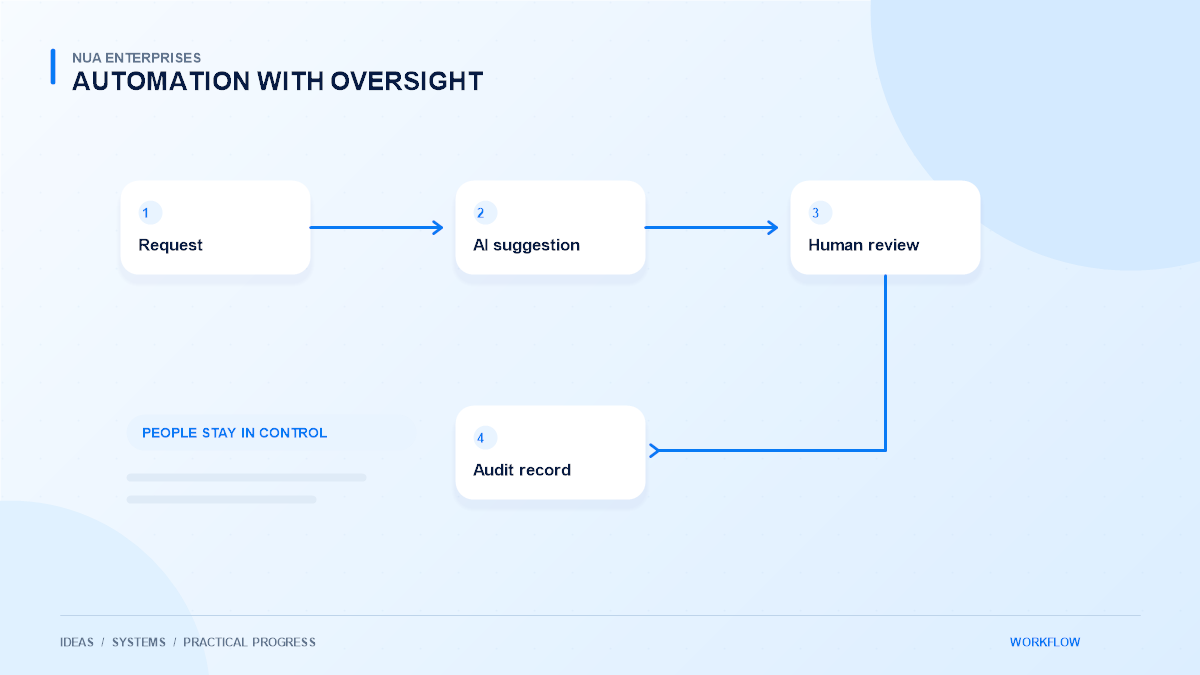
Human review needs more than an Approve button. Reviewers should see the source information, the suggested action, and any uncertainty that affects the decision. Give them enough context to disagree efficiently instead of forcing them to reconstruct the whole process.
Make the review step meaningful
An AI-generated response to a customer can remain a draft until approved. A categorization system can send unfamiliar cases to a queue. These controls make the workflow usable while keeping accountability clear. Avoid presenting an automatic decision as human-reviewed when no meaningful review has occurred.
Design for failures and exceptions
Networks fail, integrations change, and requests can arrive twice. Plan for retries, duplicate prevention, and recovery before relying on the workflow. A notification should not be sent repeatedly because the system cannot tell whether the first attempt succeeded.
Keep a clear status for each item and make failed steps visible to the responsible team. Provide a way to resume safely or complete the task manually. Test missing inputs, unexpected document formats, unavailable services, and rejected suggestions alongside the successful demonstration case.
Measure useful operational change
Agree on a baseline before launch. Review handling time, correction effort, missed tasks, and staff feedback rather than counting only how many automated actions ran. A system that produces more drafts but requires extensive correction may not improve the overall process.
Observe how the workflow affects customers as well as staff. Clearer responses and reliable handoffs can matter more than raw speed. Review examples regularly and adjust rules or source material when recurring problems appear. Keep changes documented so improvements can be evaluated honestly.
Introduce AI as a managed capability
The strongest projects combine technical implementation with training, ownership, and ongoing review. Make the system’s limits understandable and give staff a clear escalation route. Expand only after the pilot has demonstrated dependable value in ordinary conditions.
Explore NUA Enterprises AI and automation services if your team has a repetitive workflow worth reviewing. Bring an example of the process, its exceptions, and the information it uses. That provides a stronger foundation than starting with a tool and searching for a reason to deploy it.